
AI Image Generation: Current Limitations
Our AI image generation technology is constantly improving, but there are some known challenges we're still working to overcome. Understanding these limitations can help you achieve better results with our AI tools and provide the best possible source images.
Note: These challenges are common across most AI image generation systems available today. Our team is actively working to improve these areas.
What to Avoid for Best Results
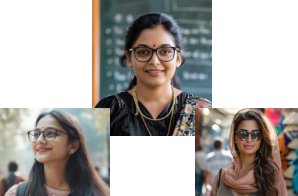
1. Glasses and Eyewear
The AI sometimes struggles with accurately recreating glasses (both prescription glasses and sunglasses). The model might:
- Distort the frame shape
- Create inconsistencies in lens transparency
- Generate asymmetrical glasses
- Misinterpret reflections on lenses
Tip: For better results, provide source images without glasses when possible, or choose templates where eyewear isn't a critical element.
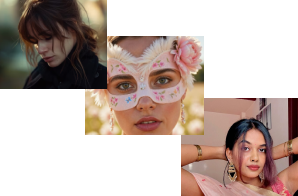
2. Obstructed Faces
The AI has difficulty accurately processing faces that are partially covered or obstructed by:
- Hands in front of the face
- Objects blocking part of the face
- Hair covering significant facial features
- Masks or face coverings
Tip: Use clear, unobstructed facial images where all primary features (eyes, nose, mouth) are clearly visible.
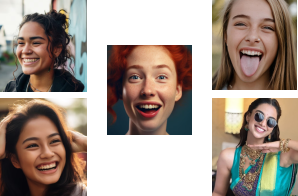
3. Extreme Facial Expressions
Strong emotional expressions or non-neutral faces can be challenging for the AI to reproduce accurately:
- Very wide smiles or open-mouth expressions
- Exaggerated emotions (surprise, anger, etc.)
- Unusual facial contortions
- Sticking out tongue or similar poses
Tip: Neutral expressions or subtle smiles tend to yield the most natural-looking results.
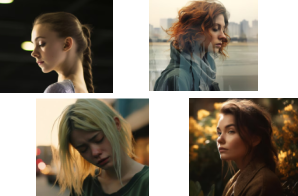
4. Side Angles & Profiles
Our AI currently performs best with front-facing or slightly angled faces. It may struggle with:
- Profile shots (side view of face)
- 3/4 angle views
- Faces at unusual angles (looking up/down)
- Tilted head positions
Tip: For optimal results, use straight-on, front-facing portrait images with the subject looking directly at the camera.
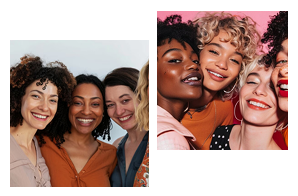
5. Multiple People in Source Images
Our current AI model is designed to focus on a single primary subject. When multiple people are present in the source image:
- The AI will typically select the most prominent face
- It may sometimes create a composite of multiple faces
- Results can be unpredictable with group photos
- Background figures might influence the generated image
- Use the settings to control which face is selected (left-to-right or right-to-left)
Tip: For best results, upload individual portraits rather than group photos. Crop your source images to include only the person you want to feature.
Our Commitment to Improvement
We're continuously working to enhance our AI technology and address these limitations. Our development roadmap includes:
- Model Updates: Regular improvements to our underlying AI algorithms
- Feature Recognition: Enhanced capability to handle complex facial features and accessories
- Expression Mapping: Better preservation of emotional expressions and unique facial characteristics
- Multi-subject Processing: Future support for accurately handling multiple people in source images
Your feedback helps us prioritize improvements! If you encounter specific issues with your AI generations, please let us know through the app's feedback feature.
Ready to Create with AI?
Despite these current limitations, our AI can still produce amazing results! Download the PicsNow app to start creating stunning AI-generated images.